


✍ Introduction
Today’s students rely a lot on technology to keep organized, manage their studies, and increase productivity. Selecting the best apps might be difficult due to the dozens of options. The proper tools can significantly improve academic performance in a variety of areas, including note-taking, time management, and teamwork.
We’ll look at the top 5 apps that students use globally to make studying easier, sharpen attention, and increase productivity. These apps can make studying easier rather than more difficult, whether you’re in school, college, or university.
🔍 1. Quizlet – Best for Smart Learning & Flashcards

One of the most widely used study apps in the world, Quizlet is particularly well-known for its effective flashcard method. Using interactive learning strategies, it facilitates students’ rapid concept memorization.
⭐ Key Attributes:
- Flashcards for speedy review
- AI-powered learning mode
- Practice exams and assessments
- Millions of research sets are accessible
💡 Reasons Students Adore It
Quizlet makes learning interesting and effective. It makes memorizing easier than ever, whether you’re studying for tests or picking up new vocabulary.
🧠 2. Notion – All-in-One Productivity Tool
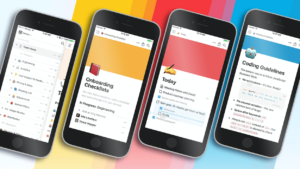
Students can manage assignments, take notes, and plan their academic lives all in one location with Notion, a potent all-in-one workspace.
⭐ Key Attributes:
- Taking notes and creating documents
- Management of tasks and projects
- Modifiable templates
- Tools for cooperation
💡 Reasons Students Adore It
By integrating everything onto a single platform, Notion replaces numerous apps. For students who wish to maintain organization and productivity, it is ideal.
✍️ 3. Grammarly – Improve Your Writing Instantly

For students who wish to get better at writing, Grammarly is an essential resource. It instantly verifies spelling, grammar, tone, and clarity.
⭐ Key Attributes:
- Checker for grammar and spelling
- Suggestions for clarity and tone
- Detecting plagiarism (premium)
- Compatible with applications and browsers
💡 Reasons Students Adore It
It increases students’ confidence and professionalism by assisting them in writing flawless projects, essays, and emails.
🎓 4. Khan Academy – Free Learning for Everyone

Khan Academy is a well-known educational website that provides free classes on a variety of topics.
⭐ Key Attributes:
- Free video courses
- Practice tasks and assessments
- Math, science, economics, and other subjects
- Dashboard for personalized learning
💡 Reasons Students Adore It
It is perfect for individuals who wish to learn at their own pace because it offers excellent instruction at no cost.
🌱 5. Forest – Stay Focused & Beat Distractions

By making concentration into a game, the innovative productivity software Forest aids kids in maintaining focus.
⭐ Key Attributes:
- A focus timer with the idea of growing trees
- monitors productivity periods
- promotes using a phone less
Why Students Enjoy Gamified Experiences:
It encourages pupils to stay concentrated and avoid distractions, which makes study sessions more fruitful and pleasurable.
✅ Conclusion
Your study regimen might be radically changed by selecting the appropriate apps. Millions of students throughout the world trust the aforementioned apps—Quizlet, Notion, Grammarly, Khan Academy, and Forest—for a reason.
You can boost learning, increase productivity, and improve academic performance by integrating these technologies into your everyday routine. Take your studies to the next level by using them now!
👉 Related Article:
If you’re also facing search issues, check our detailed guide on fixing Windows 11 search not working problems.
👉 https://optitechra.com/windows-11-search-not-working-fix/